Simple Auto Bridge removes the need to place every bridge block by hand. When the function is enabled, the add-on automatically creates a safe path as the player moves forward.
How to use it

- Obtain the Auto Bridge Settings item.
- Use the item to open the control interface.
- Enable Auto Bridge and begin moving in the required direction.
- Open the same interface again when the function needs to be disabled.
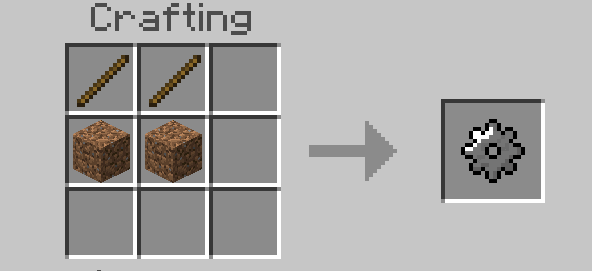
The settings item has its own crafting recipe, shown in the description images. The system is compatible with blocks added by other add-ons, supports achievements and does not require experimental features.
Because the bridge is generated automatically, test the direction and selected block before crossing a large gap, especially in important survival worlds.