Author: sirob
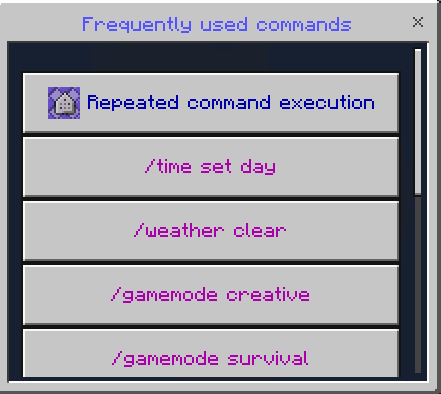
Turbo Commands stores Minecraft commands behind buttons in a configurable menu. It is useful for building, world administration and repeatedly testing commands: save the text once, then call it from the special item. This download is v1.1.30 for the stable Minecraft 26.60 release.

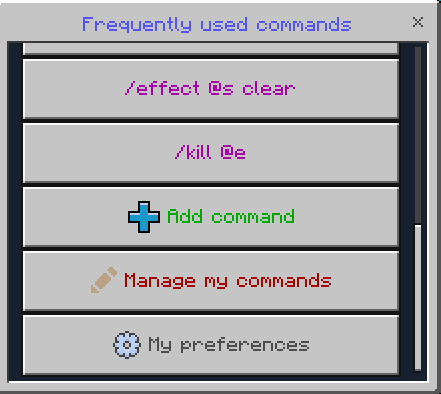
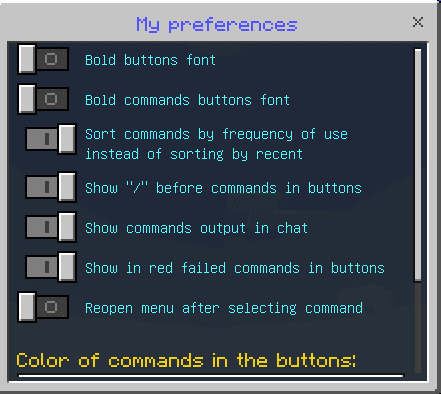
Start and configure
Activate the resource and behavior packs and enable Beta APIs. Run /function sirob_turbocommands to obtain access and the menu item, then use the item by tapping or right-clicking. A replacement item is available in the creative Construction category. Remove older copies of both packs before activating this version.
Add a command and choose its position, edit it later or clear its text to delete it. Repeated execution supports a count and a delay; Minecraft runs 20 ticks per second. Personal preferences control bold labels, command visibility, leading slashes, output to chat, reopening the menu and colors. You can also sort commands by recent or frequent use; failed commands are marked in red.
To toggle another player’s access, an administrator can run /execute as playername run function sirob_turbocommands. Access allows that player to use commands through the addon even without ordinary operator status, so grant it deliberately. On a Realm, configure the downloaded world and its packs before uploading it back. The build depends on the matching stable game release and Beta APIs; Preview builds are not interchangeable.