Today, 03:01

Addon: Undeadcraft Version 3.0.1

3
0
1
Addon: Undeadcraft Version 3.0.1

Author: Axelpvz

Do you think zombies suck? Well, why not try this, with better animation, actual zombie hordes, and smarter IA with unique abilities this addon will make zombies an actual challenge without spamming your world with reskins of the basic zombie.

Addons about zombies are almost the same every time, they add resident evil like zombies, zombies with illogical abilities like spitfire and summon minions, or in the worst case, they just add buffed reskins of the vanilla zombie. I´m pretty tired that almost no one tries to make a vanilla-like addon about zombies, so that´s why I made this, an addon with challenging zombies but that tries to keep certain logical about what zombies can do as ex-humans, as well as adding new zombie version of other mobs, with abilities that change depending on how the zombification affects them.

<mark class="marker-yellow"> </mark>

Current Content

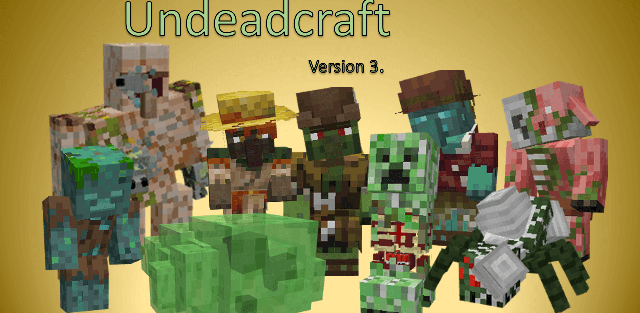
This addon adds many variants to all humanoid zombies, improvements on IA, better animations, zombie hordes mechanics, and new zombie variants to other mobs, as well as the possibility for the player to turn into a zombie themselves. All to give a proper "Zombie apocalypse" feeling to your survival without turning it into resident evil.

Improved Animations

This addon changes the model and animations of all humanoid zombies, to make the zombies feel more "alive" (pun intended). This includes tweaked animations for basic actions like walk, run and hit, animations for special behaviors added on this addon, and even custom spawn and death animations, I´m not gonna enter on details here, you can see them across the videos showing the addon or while you try it yourself.

Changes to the IA and spawning.

Undeadcraft Version 3.0.1 1

All zombies in general are neutral to each other, and can´t be damaged by each other, this includes new zombies added by this addon that don´t exist in vanilla and the player if they become a zombie

Humanoid zombies now come out of the ground when spawned instead of just instantly appearing, they are hostile to all non-undead mobs, including other monsters, but focus on the player, the exception to this are zombie piglins, they ignore the player if it wears gold armor and has smaller detection range for non-piglin entities, including the player.

Zombies spawn less, but the ones that spawn can call reinforcements once when they target a player (this is to improve performance), and they sometimes can spawn in huge zombie hordes, explained later in this post.

Humanoid Zombie Transformations

Basic Zombies, Zombie Villagers and Illagers can transform into either a Drowned or a Husk. The Drowned transformation works as normal, except they don´t drop their armor now, and to transform into a husk they must take sun damage. Each time they do, there´s a chance they´ll turn into a husk and stop burning, which increases with the difficulty. This transformation doesn´t reset the entity; they keep health, names, trades (in the case of zombie villagers), etc.

General Zombification

Any non-undead mob that dies by a zombie tries to turn into a proper zombie variant now, vanilla or from the addon. If none are found, it spawns 1 "Fleshbound soul"  for every 10 hp of the total max health; this can be killed and transform into a ramzom zombie from the addon with 20 health or less after a minute

No Zombie Friendly Fire

Undeadcraft Version 3.0.1 1

All zombies, be it vanilla, from the addon, from other addons or zombified players, are unable to hurt other zombies; zombies from the addon won't target other zombies either.

Custom Commands and Gamerules

This addon has 3 commands to allow some customization to the experience, especially player zombification

  • /udc:zombify and /udc:unzombify : These two commands simply turn the selected players into zombies or cure them, more so thought for ease of use in creative mode. /udc:gamerule : This command has a set of gamerules that allow you to customize the behavior of the add-on. help : Simply gives info on the existing gamerules. zombiesIgnoreMobGreafing : Determines if zombies can break blocks even if the vanilla mobGriefing rule is set to false. zombificationBasedOnDifficulty : If set to false, zombification is always 100% successful regardless of the world difficulty level. playersCanZombify : Controls whether players are allowed to become zombies. zombiePlayersCanRegen : If set to false, zombie players cannot regenerate health naturally. zombiePlayersFoodPenalty : If true, the nutrition gained from eating food is halved and saturation is completely negated for zombie players. zombiePlayersFoodOnKill : Controls whether zombie players restore hunger and saturation when they kill an entity. zombiePlayersHealthOnKill : Controls whether zombie players heal upon killing an entity. zombiePlayersBurnOnDayLight : Determines if zombie players catch fire when exposed to sunlight. spawnFleshboundSouls : Controls whether mobs that lack a specific zombie counterpart turn into fleshbound souls upon death. mobsCanZombify : Determines if mobs other than standard villagers can be zombified. zombifyWithRottenFlesh : If true, players will become infected by eating rotten flesh. cureWithGoldenApples : If true, zombie players can cure themselves by eating a golden apple. goldBypassZombification : Allows zombie players holding gold items to bypass friendly fire protections to hurt other zombies, and prevents them from zombifying the mobs they kill. netheriteBypassZombification : Functions identically to the gold bypass, but applies to holding netherite items.
  • /udc:zombify and /udc:unzombify : These two commands simply turn the selected players into zombies or cure them, more so thought for ease of use in creative mode.

/udc:zombify and /udc:unzombify : These two commands simply turn the selected players into zombies or cure them, more so thought for ease of use in creative mode.

  • /udc:gamerule : This command has a set of gamerules that allow you to customize the behavior of the add-on. help : Simply gives info on the existing gamerules. zombiesIgnoreMobGreafing : Determines if zombies can break blocks even if the vanilla mobGriefing rule is set to false. zombificationBasedOnDifficulty : If set to false, zombification is always 100% successful regardless of the world difficulty level. playersCanZombify : Controls whether players are allowed to become zombies. zombiePlayersCanRegen : If set to false, zombie players cannot regenerate health naturally. zombiePlayersFoodPenalty : If true, the nutrition gained from eating food is halved and saturation is completely negated for zombie players. zombiePlayersFoodOnKill : Controls whether zombie players restore hunger and saturation when they kill an entity. zombiePlayersHealthOnKill : Controls whether zombie players heal upon killing an entity. zombiePlayersBurnOnDayLight : Determines if zombie players catch fire when exposed to sunlight. spawnFleshboundSouls : Controls whether mobs that lack a specific zombie counterpart turn into fleshbound souls upon death. mobsCanZombify : Determines if mobs other than standard villagers can be zombified. zombifyWithRottenFlesh : If true, players will become infected by eating rotten flesh. cureWithGoldenApples : If true, zombie players can cure themselves by eating a golden apple. goldBypassZombification : Allows zombie players holding gold items to bypass friendly fire protections to hurt other zombies, and prevents them from zombifying the mobs they kill. netheriteBypassZombification : Functions identically to the gold bypass, but applies to holding netherite items.

/udc:gamerule : This command has a set of gamerules that allow you to customize the behavior of the add-on.


Download Undeadcraft Version 3.0.1 (.mcaddon)
Download

[1.57 Mb] Downloads: 2


How to install the add-on

Download the .mcaddon or .mcpack file, open it with Minecraft and wait for the import to finish. Then enable the resource and behavior packs in the world settings. If the add-on requires experiments, turn them on before launching the world.

Supported Minecraft Versions
26, 26.30

Author: Steve

Category: Mods

ОS: android, windows, iOS

Оставить комментарий
reload, if the code cannot be seen