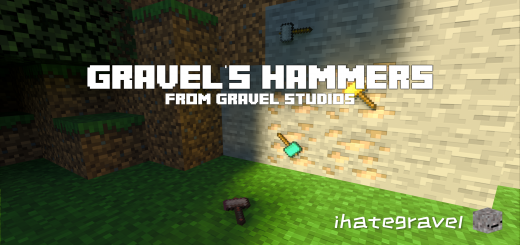
Gravel's Hammers Add-On is a versatile mod offering a variety of hammers, each mirroring the aesthetics and mechanics of vanilla pickaxes, ensuring a harmonious and immersive Minecraft experience.
Hammer Durabilities:
- Wood: 60
- Stone: 132
- Iron: 251
- Gold: 33
- Diamond: 1562
- Netherite: 2032
Dynamic Durability System
Gravel's Hammers features a dynamic durability system, ensuring balanced and strategic gameplay by deducting durability only for the blocks you break.
Special Block Mining Mechanics
Uncover new possibilities with unique block mining mechanics:
-
3x3x1 - Activatable by sneaking while mining a block. (Costs 9 Durability Points)
-
3x3x2 - Triggered by interacting with a block while sneaking. (Costs 18 Durability Points)
-
3x3x3 - Exclusive to the Netherite hammer with right-clicking. (Costs 27 Durability Points)
Dynamic Block Breaking System
Preserve the spirit of vanilla survival immersion with a dynamic block breaking system that avoids breaking any Non-Survival-attainable blocks.
Crafting Recipes:
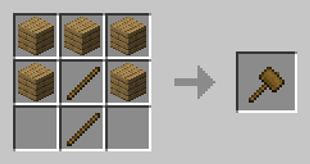
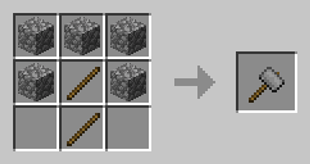
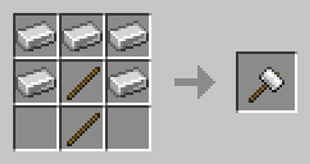
Craft your hammers at the workbench using the following recipes:
- Wood Hammer:
- Stone Hammer:
- Iron Hammer:
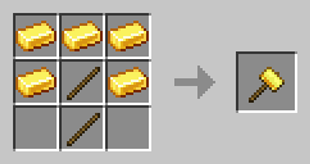
- Gold Hammer:
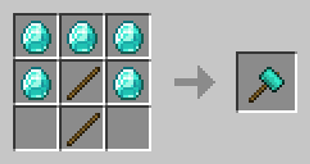
- Diamond Hammer:
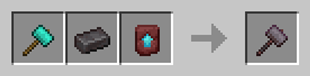
- Netherite Hammer:
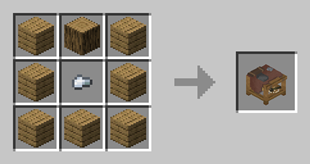
- Workbench:
Enchanting Notice:
While Gravel's Hammers support pickaxe enchantments for enhanced utility, be aware that the unbreaking enchantment is not supported.
Experimental Features:
To experience Gravel's Hammers to its fullest, enable all experimental features as the add-on requires them.