21-09-2023, 17:10

Addon: Play Mod

12 762
0
1
Addon: Play Mod

This add-on adds a camera to your minecraft, it will allow you to place frames to start a fully customizable cinematic, modify time and animations, use your imagination. I hope you like it, read more about it by scrolling down. 

Created By umKoro

Add-on Information.

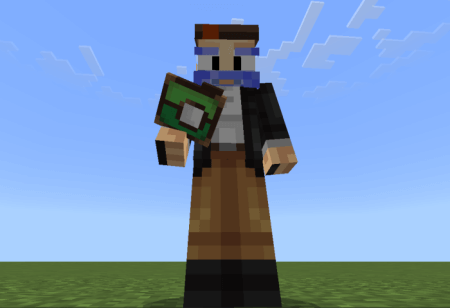
This is the camera added to the game, yes, it looks like a pokeball!


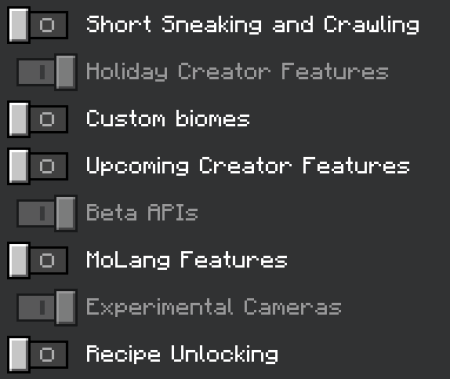
Don't forget to enable these settings.


How to use:

Right-click with the camera in hand to open the panel.
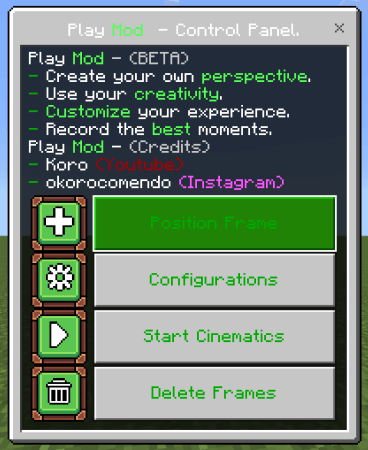


  • The first button adds a position for the location you are looking at.
  • The button, settings, will open another interface that will allow you to configure some functions in your cinematic.
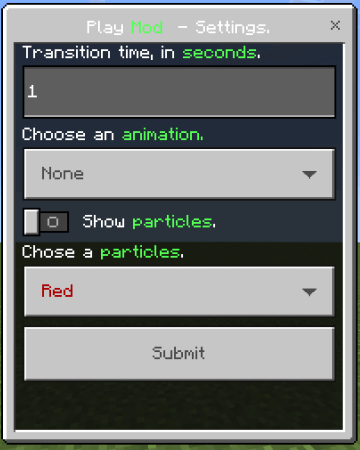
 

After completing your settings, save them, then start your cinematics.
Download Play Mod (for Minecraft 1.20.15) (.mcaddon)
Download

[28.59 Kb] Downloads: 732


Download Play Mod (for Minecraft 1.20.30) (.mcaddon)
Download

[138.76 Kb] Downloads: 1048


Compatibility and installation

  • Minecraft versions: before downloading, compare your game build with the supported versions: 1.20.
  • Platforms: this content is listed for android, windows, iOS; behavior may differ on other devices.
  • Installation: open the downloaded file in Minecraft Bedrock/PE and enable the pack in world settings. If experiments are required, turn them on before launching the world.

For a complete world setup, browse more Minecraft Bedrock mods, maps, textures and shaders.

Turn on experimental options in map settings
Supported Minecraft Versions
1.20

Author: admin

Category: Mods

ОS: android, windows, iOS

Оставить комментарий
reload, if the code cannot be seen